



A new standard for professional installers and even advanced home users.
The modern smart home market required a single standard that could combine devices from different manufacturers without any compatibility issues.The Matter — protocol was the solution - a new universal communication standard created by industry leaders (Apple, Google, Amazon, Samsung).
For professional installers and LED lighting integrators, switching to Matter means the ability to create systems that work equally easily in any popular program: Apple Home, Google Home, SmartThings or Home Assistant.
In this article, we will analyze in detail the advantages of the Matter protocol for lighting systems and show a specific technical solution for facilities based on SUNRICHER equipment.
The main advantages of the Matter protocol in lighting
1. Complete independence from the client's smartphones: You no longer need to find out what operating system the customer has. A device with Matter support is suitable for everyone. If someone in the family has an iPhone and someone has an Android, everyone will be able to control the light simultaneously and without failures.
2. Speed and work without the Internet: Commands are transmitted within the local network of the house via a regular Wi-Fi router. Even if the client's Internet connection from the provider temporarily disappears, the light from the phone will continue to turn on and adjust instantly.
3. Easy addition of devices: Setup is done by scanning a single standard QR code on the device body. No complicated search and approval procedures.
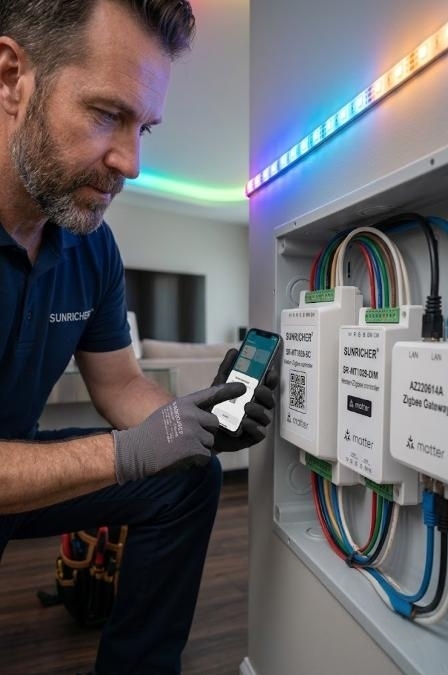
LED strip control via Matter: A new standard for installers based on SUNRICHER solutions
A smart home has become easier. Previously, installers had to select equipment for a specific customer's phone: for Apple - one controller, for Google - another. Today, the new Matter protocol solves this problem.
Matter is a common language that all systems (Apple Home, Google Home, Amazon Alexa) understand. A device with the Matter logo is guaranteed to connect to your client's smartphone.
The main advantage of modern Matter equipment is Thread technology. This is a special wireless network for a smart home. Its huge plus is that it does not load the home Wi-Fi router. Each connected light controller transmits the signal further, creating reliable coverage (Mesh network) throughout the house.
Below we will analyze three proven equipment positions, how to connect them and in what situations to use them to get the most out of the Matter protocol.
1. Controller for color strips: SR-MT1029-5C (Matter + Zigbee)
This is a powerful 5-channel controller (Dual Tech). According to its passport, it supports two technologies at once: the latest Matter over Thread and the classic Zigbee. Designed for the most complex multi-color RGB+CCT strips, where you can change both the color and temperature of white light.
- When to use: In living rooms, restaurants or showrooms where the customer needs to control the atmosphere - from bright white light for work to colorful light for a party.
- How it works with Matter:If the customer already has a smart speaker with Thread Border Router function (such as Apple HomePod mini or Google Nest Hub), this controller does not require additional gateways..
- How to connect and configure:
1. Connect the power supply (12-24V DC) to the INPUTpins. The maximum load for the entire controller is up to 20A.
2. Connect the ribbon wires to the contacts OUTPUT: overall plus (V+), R, G, B, WW (warm white), CW (cold white).
3. Press the button "Prog" 5 times to put it into search mode.
4. Simply open the Apple Home or Google Home app on your phone and scan the Matter QR code directly from the controller case. The light will instantly appear on your phone.
2. Controller for main light: SR-MT1029-DIM (Matter + Zigbee)
A compact dimmer for a regular single-color strip. It also has a dual chip (Matter + Zigbee).
- When to use: For recessed lighting, kitchen worktop lighting or staircase lighting. This is the perfect solution for places where you just need to smoothly turn the light on and off.
- How to connect and configure:
1. The power supply (12-24V) is connected to INPUT.
2. The ribbon connects to OUTPUT (contacts V+ and V-).
Please note: a maximum of 4A can be supplied per channel (from 48 to 96 Watts depending on voltage).
3. It is added to the system just as easily: press the "Prog" button 5 times and scan the QR code with your smartphone.
- An additional plus of both controllers: Even if the phone is discharged, they support direct binding (Touchlink) to wireless remotes. You can make the tape turn on from the smartphone and in parallel from the wall remote control.
3. Gateway converter: AZ220614A (Zigbee Bridge)
If controllers already have Matter built-in, why do you need this gateway? The AZ220614A gateway acts as a "bridge" between the two worlds. It connects regular Zigbee devices and feeds them into the Matter system.
When you can't do without it:
- No smart speaker: If the customer doesn't have an Apple HomePod mini or Google Nest Hub (which are required for Matter over Thread to work), but he wants to control the light from his iPhone. Then you use this gateway. It connects to the router and displays all your controllers in Apple HomeKit.
- Large existing Zigbee network: If the facility already has many devices that work only on Zigbee (old controllers, remotes, motion sensors), the AZ220614A gateway will unite them all.
How to connect:
- The gateway is placed near the router and connected to power.
- Be sure to connect to the router with a regular network Internet cable (via the LAN connector). This gives 100% stability, which does not depend on the quality of Wi-Fi.
- You add SR-MT1029 controllers (in Zigbee mode) to this gateway, and you add the gateway itself to your phone using the Matter code.
The Matter protocol eliminates the headache of equipment compatibility. Using SR-MT1029 controllers, you get a universal tool:
- If the object is modern and the client has an Apple HomePod, you connect the tape directly via Matter (Thread). Nothing superfluous, instant response and simple scanning of the QR code.
- If the object is built on a classic Zigbee network, or a more complex connection with various sensors is required, you use these same controllers together with the AZ220614A gateway.


